



News & Releases
Discover the latest features and most important changes in the Omnora App.
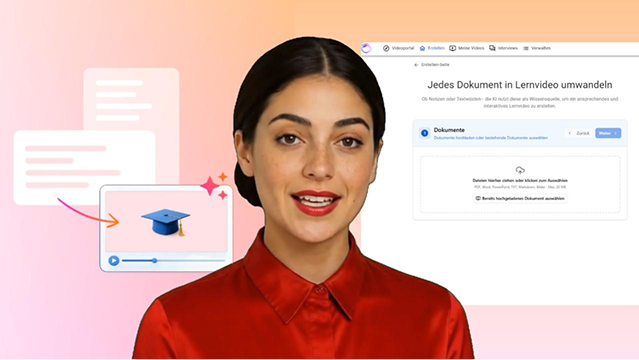
Turn text into learning videos
Automatically convert any type of text, links, or documents into an interactive video.
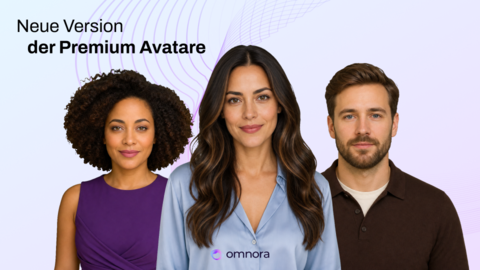
More realistic. More personalized.
The new version of our premium avatars is now available online.
September 2026
New Sidebar
The Authoring Tool now features a new sidebar on the left where you can find all important pages at a glance.
AI Labeling in the Brand Kit
In accordance with European labeling requirements, you can now centrally label AI-generated videos via the Brand Kit. Once activated, this applies automatically across your entire company.
Screen Recording with Avatar
Combine an avatar with your screen recording.
New Features in the Timeline
🚀 The timeline has been completely redesigned and equipped with new features: You can now lock, hide, align, and group elements. Watch tutorial
Adjust Video Speed
Customize the playback speed of a video.
August 2026
Improved Quiz View
The quiz in the player has a new design—the logic and buttons remain unchanged. The custom player color now also applies to buttons and decorative elements.
Preview Images for Scenes
Scenes in the editor now display a real preview image from the canvas instead of the previous placeholder.
New Default Avatars
🙍Meet our four new default avatars: Rowan, Celine, Nia, and Malik. Watch Demo
July 2026
Apply all speaker changes with a single click
Changes to the speaker can now be applied with a single click. You no longer have to click through each scene individually—this now happens automatically in the background. Watch tutorial
Smart Design-Templates
🎨 Smartly generated templates for AI videos: Our designs aren’t rigid templates—they’re customized to fit your content. Once your brand kit is set up, it’s automatically incorporated when creating your AI videos.
May 2026
New Version of Our Premium Avatars
🚀 We've updated our premium avatars to a new version. View Avatars
Turn documents into an interactive video
✨Automatically turn any type of text, links, or documents into a fully designed, interactive training video. Watch tutorial
April 2026
Brand Kit
🎨You can now set up your own brand kit—consisting of logos, colors, fonts, and more—that automatically shapes the look and feel of your training videos.
February 2026
Automatically dub videos in any language
Automatically re-dub your videos and screen recordings in the language of your choice.
January 2026
Placing avatars in front of slides
The video is no longer locked behind the slide, so you can position videos and avatars in front of your slides, shapes, and other elements.
Color gradients
In the color selection, you can now choose between solid colors and color gradients. There's also a new eyedropper tool that lets you select any color directly from your screen.
Copy & Paste Keyboard Shortcuts
You can now use keyboard shortcuts such as “Delete,” “Ctrl+C,” and “Ctrl+V” to easily copy and paste elements into another scene.
Merge Tracks
Tracks in the editor's timeline are now automatically merged whenever possible. This improves workflow by providing a clearer and better-organized timeline.
Dezember 2025
KI-Stimme für Bildschirmaufnahmen
✨Ab sofort kannst du deine Bildschirmaufnahmen und Videos automatisch mit einer KI-Stimme vertonen lassen. Du nimmst den Bildschirm auf, sprichst frei drauf los und Omnora macht daraus eine saubere, professionell gesprochene Tonspur für deine Videos.
Vollständig unterstützter MP4-Download
Mit der Download-Funktion kannst du dein Video als MP4-Datei exportieren. Diese Videodatei enthält alle Elemente wie Layouts, Formen, Folien usw. Sobald der Download fertig ist, erhältst du eine E-Mail.
+130 neue Avatare von Synthesia
Mit der neuen intelligenten Text-Optimierung werden deine Videos automatisch mit KI-Stimme vertont ohne deine Füllwörter, Pausen und Versprecher zu beachten. Einfach aktivieren und ausprobieren.
Intelligente Text-Optimierung für die KI-Vertonung
Mit der neuen intelligenten Text-Optimierung werden deine Videos automatisch mit KI-Stimme vertont ohne deine Füllwörter, Pausen und Versprecher zu beachten. Einfach aktivieren und ausprobieren.
Neue Pro-Stimmen
Wir haben 6 neue KI-Stimmen hinzugefügt, die insbesondere für die deutsche Sprache optimiert sind: Tristan Pro, Xena Pro, Thierry Pro, Hanno Pro, Sunny Pro, Thalita Pro.
November 2025
Rückblick & Ausblick auf 2026 – Building what's next
Willkommen zu unseremOmnoraRückblick! Wir nehmen euch jetzt mit durch die Highlights von 2025 – und schauen gemeinsam auf das kommende Jahr.
Neue Schriften im Editor
Füge ganz einfach Text-Elemente hinzu und wähle aus einer Vielzahl neuer, moderner Schriftarten – für ein professionelles und individuelles Erscheinungsbild.
Explorative Interviews
Wir heben die Wissenssicherung auf die nächste Stufe. Sichere das Wissen von deinem Team smart überexplorative Interviewsund erstelle daraus Formate wie Wissensartikel, Chat Bot & mehr. Spreche jetzt mit unserem Team, um mehr zu erfahren.
Szene splitten
Du kannst eine Szene in zwei Szenen aufteilen, um Quizze dazwischen zu platzieren, unterschiedliche Layoutvorlagen anzuwenden und das Projekt in Abschnitte zu teilen.
Oktober 2025
Der neue Editor ist da!
Der neue Editor erwartet dich–mit vielen Verbesserungen und neuen Funktionen, die dir noch mehr Übersicht, Flexibilität und Kontrolle bieten.
September 2025
E-Mail Benachrichtigung für KI Videos
Erhalteeine automatische E-Mail Benachrichtigung, sobald dein neu erstelltes KI-Video bereit ist.
Texterstellung mit KI für einzelne Folien
Die automatische Texterstellung mit unseremKI-Skript Generatorkannst dujetzt auch verwenden, um direinenSprechertext für eine einzelne Foliezu generieren.
Wartezeit bei der Erstellung eines KI-Videos überspringen
Die Erstellung eines KI-Videos ist jetzt noch schneller, denn dein Video wird ohne Wartezeit direkt erstellt. Während das Video im Hintergrund verarbeitet wird, kannst du die Seite jederzeit verlassen und den Browser schließen – der Prozess läuft zuverlässig weiter.
Neue Erstellen-Seite
Wir haben die Erstellen-Seite komplett überarbeitet, damit du noch schneller und einfacher alles findest, was du brauchst.
August 2025
Automatisch generierte Rückfragen im Interview
Wenn die Antworten in einem Interview Bereich zu kurz sind, werden automatisch Rückfragen generiert. Jeder Teilnehmer bekommt jetzt individuelle Rückfragen basierend auf seinen Antworten.
Anzeige der Lizenz Nutzung
Als Benutzermanager könnt ihr jetzt im Einladungsmodus sehen, wie viele Lizenzen aktuell bei euch verwendet werden und wie viele Lizenzen noch verfügbar sind.
Neues Design im Rekorder
In der Erstellung könnt ihr jetzt einfach und schnell zwischen unserem KI Video Generator, der Bildschirmaufnahme und der klassischen Aufnahme wechseln. Die bisherige Formatauswahl an der linken Seite wurde entfernt. Durch das optimierte Layout ist der Aufnahmeprozess einfacher und intuitiver.
Bearbeiten von Artikeln
Eure KI-erstellten Interview Artikel können jetzt direkt in der App bearbeitet und aktualisiert werden.
Juli 2025
Antworten im Interview bearbeiten und löschen
Falls ihr eine Formulierung anpassen oder einen Begriff korrigieren möchtet, könnt ihr eure Antworten direktbearbeiten. Oder löscht einzelne Antworten, um sie durch neue zu ersetzen – ganz unkompliziert.
Pausenlänge individuell festlegen
Ihrkönnt nun Pausenmit individueller Länge in euren KI-Sprechertext einfügen – statt der festen 500 Millisekunden.
Juni 2025
KI-gestützte Wissensartikel – jetzt auch in der App
✨Ab sofort könnt ihrdirekt in der App automatisch fundierte Wissensartikel aus euren beantworteten Interviews erstellen lassen – schnell, präzise und ein richtiger Mehrwert!
Interviews neu generieren
Greift auf eure ursprüngliche Eingabe zurück, passt sie bei Bedarf an und lasst automatisch ein neues Interview erstellen. So erzielt ihr im Handumdrehen noch bessere Ergebnisse!
Mai 2025
Mehr Kontrolle im KI Quiz – dank erweiterter Einstellungen
Bestimmt selbst, wie viele Fragen und Antwortmöglichkeiten euer KI Quiz enthalten soll – oder überlasst die Auswahl der KI. So passt ihr jedes Quiz optimal an eure Bedürfnisse an.
Neue Domain Omnora
SlidePresenter wird zu Omnora! Im Zuge unseres Rebrandings zu Omnora stellen wir auch unsere Plattform auf die neue Domain um. Unsere Anwendung ist bereits unter https://app.omnora.com erreichbar.
Keine Sorge–alle existierenden Links werden dauerhaft unterstützt.
April 2025
Der neue KI Video Generator
✨ Entdeckt unseren neuen KI-Video-Generator, mit dem ihr jetzt noch einfacher Videos mit KI-Stimmen und Avatarerstellen könnt.
Neue "Pro"-Stimmen
Ab sofort stehen euch neue KI-Stimmen zur Verfügung, die noch realistischer klingen. Sie sind mit dem Label „Pro“ gekennzeichnet und verleihen euren Inhalten eine noch professionellere Note.
Mehr Flexibilität im Interviewprozess
Interviewteilnehmer können eine Frage im Interview überspringen, um diese erst später zu beantworten. Auch können Teilnehmer selber entschieden, welche Frage sie im Interview als Erstes beantwortet möchten.
März 2025
Sprachauswahl für Skript Generierung
✨Neben unserer automatische Spracherkennung könnt ihr ab jetzt auch selber die gewünschte Sprache zur Skript Generierung auswählen.
Automatische Benennung von Aufnahmen
Eure Aufnahmedateien werden jetzt automatisch nach dem Titel der Präsentation benannt, sodass ihr eure Dateien in der Mediathek immer schnell finden könnt.
Reihenfolge mit Drag&Drop ändern
Ihr könnt die Reihenfolge der Interviewfragen mit unserer neuen Drag&Drop Funktion in Sekunden ändern.
Februar 2025
Videos teilen – jetzt noch einfacher
Unsere Teilen-Funktion wurde rundum überarbeitet: Videos lassen sich jetzt intuitiver teilen und Sicherheitsprofile einfacher verwalten. So behaltet ihr jederzeit die volle Kontrolle.
Schnellere Avatar-Generierungszeiten
Mit einigen technischen Verbesserungen konnten wir die Generierungszeiten für Avatar-Videos weiter beschleunigen.
Verbesserte Navigation im Reiter
Wir haben für euch unsere Navigation verbessert, sodass ihr nun direkt über den Reiter "Präsentationen" auf eure erstellten Präsentationen schnell und einfach zugreifen könnt.
Januar 2025
Einführung einer neuen Berechtigungsstufe
Mitder neuen Berechtigungsstufe können Interview-Manager alle Interviews des Unternehmens verwalten, bearbeiten und im Überblick behalten.
Interviews in der App verwalten
Über die neue Verwalten-Seite könnt ihr auf eure erstellten Interviews einfacher zugreifen und diese bearbeiten,Teilnehmer zuweisen, löschen etc.
Dezember 2024
Jahresrückblick 2024
2024 war ein Jahr voller bahnbrechender Neuerungen bei Omnora! Wir haben viele neue Funktionen entwickelt, die euch helfen, eure Trainings noch effizienter und professioneller zu erstellen.
Neue Updates im Intelligence Management
Dieser Monat steht imZeichen des Intelligence Mangements: Verbesserte Designs, eine einfache Handhabung und neue Formate wie Bildschirmaufnahmen sind jetzt in der App möglich, um die Interviewfragen zu beantworten.
Oktober 2024
Sprechertexte aus Bildern und PDFs generieren
✨Ab sofort erkennt unser Skriptgenerator nicht nur Texte und Notizen, sondern auch Bilder. Damit könnt ihr Sprechertexte auch aus PDFs, JPEGs und PNGs generieren lassen – ideal für noch mehr Flexibilität!
Avatar-Generierung ohne lange Wartezeiten
Aufgrund der hohen Nachfrage kam es bislang vereinzelt zu Verzögerungen bei der Avatar-Generierung. Jetzt werden alle Avatare und KI-Stimmen sofort generiert – so könnt ihr Inhalte in Omnora noch schneller erstellen.
September 2024
Avatar-Generierung ohne lange Wartezeiten
✨ KI Inhalte können jetzt einfach & nach der Erstellung noch bearbeitet und aktualisiert werden.
Folien einfach ersetzen im Editor
Mit unserer neuen Ersetzen-Funktion könnt ihr Folien einfach und nachträglich noch im Editor austauschen.
August 2024
Übersetzung von Dokumenten
🌏 Vorbei mit aufwendigen Übersetzungseingaben – Dokumente wie PowerPoint, PDF und Word lassen sich mit unserer smarten Übersetzungsfunktion in über 30 Sprachen übersetzen.
Videos einfach ersetzen im Editor
Mit unserer neuen Ersetzen-Funktion könnt ihr Videos einfach und nachträglich im Editor austauschen.
Juli 2024
Anredeform für die KI bestimmen
Damit der generierte Sprechertext an eure Unternehmenssprache perfekt angepasst ist, könnt ihr zwischen der informellen (Du) und der formellen (Sie) Anredeform wählen.
Folien im Editor bearbeiten
Folienbearbeitung leicht gemacht – bearbeitet eure Folien ab sofort direkt im Editor.
Neue KI-Stimmen für Text-To-Speech
✨Entdeckt unsere neuen KI-Stimmen wie Louisa, Conrad und Ralf für die Text-To-Speech Erstellung.
Juni 2024
Verbesserte Aussprache der KI-Stimmen
Die Aussprache von Begriffen und Eigennamen in Text-To-Speech wird jetzt noch besser: Ändert einfach die Aussprache einzelner Wörter mit der Hilfe unserer mehrsprachigen KI-Stimmen.
Neue Geschwindigkeitsstufen
Wählt die passende Geschwindigkeit für eure KI-Stimme in unseren erweiterten Auswahl an Geschwindigkeitsstufen.
Vergrößerte Auswahl an Avataren
🙋♀️ Hallo neue Gesichter! Ihr könnt ab sofort unsere vergrößerte Auswahl an neuen Avataren nutzen.
Mai 2024
KI-generierte Quizze
✨Erstellt zeitsparend & vollautomatisiert passende Quizfragen und Antwortmöglichkeiten für eure Videos mit unseren KI-generierten Quizzen.
Sprechertext übersetzen
Lasst den Sprechertext für eure Folien in über 40 Sprachen übersetzen. Und das Beste: Unsere KI-Stimmen können diesen übersetzten Text in jeder gewünschten Sprache einsprechen.
Pausen einfügen in Text-To-Speech
Mit Pausen in eurem Sprechertext kann das Publikum die Inhalte in Ruhe auf sich wirken lassen.
April 2024
KI Avatare
🙋Keine Lust, sich selber aufzunehmen? Entdeckt unsere KI-Avatare, mit denen ihr eure Texte einfach automatisch einsprechen lassen könnt.
Verbesserte Vorschau für Text-To-Speech
Mit der verbesserten Vorschau für Text-To-Speech könnt ihr die Aussprache einzelner Sätze und Wörter noch einfacher anhören.
März 2024
Tonspur schneiden
Probiert die neue Schneide-Funktion im Editor aus und bearbeitet die Tonspur noch einfacher.
Februar 2024
PowerPoint in Video umwandeln
✨ Ladet einfach eure Power Point Datei hoch und wir verwandeln es in ein fertiges Video! Mit Hilfe unserer KI wird jede PowerPoint zum Leben erweckt.
Upload im Editor
Ihr könnt neue Mediendateien direkt im Editor hochladen, um sie in einer bestehenden Präsentation zu nutzen.
Automatische Übersetzung der Untertitel
🌍 Erstellt Untertitel in über 50 Sprachen mit nur einem Klick: mit der automatischen Übersetzungsfunktion könnt ihr einfach und schnell Untertitel hinzufügen.
August 2026
A demo interview anyone can try
🎙️A public demo interview to get started Try it now
Uploads up to 100 MB
📦 Documents, presentations, and images can now be up to 100 MB in size—up from the previous limit of 20 MB.
July 2026
Redesigned video creation
🎬Your video creation briefing now consists of a single text field where you can describe your topic, focus, and desired tone.